Appendix B: Text placeholders
Text placeholders can be included in fields throughout the Collector Wizard. These placeholders will be substituted with time information gathered at the time of collection. The following placeholders can be inserted into text fields:
| Placeholder |
Description |
Information inserted when collection is run |
| {StdDateTime} |
Long Date-Time |
Date/Time in long format: YYYY-MM-DD-HH-MM-SS |
| {DateTime} |
Short Date-Time |
Date/Time in short format: MM-DD-YY HH-MM-SS |
| {ComputerName} |
Computer Name |
Name of the computer running the collection |
| {LoginName} |
Login Name |
Currently logged in user running the collection |
| {ProcessId} |
Process ID |
Process ID of the Nuix Collector process |
A right-click on any text field will display a context menu to insert any of these placeholders:
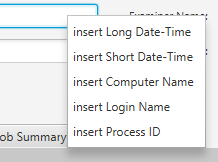
The selected placeholder will be inserted at the current cursor position within the field. More than one placeholder may be inserted or typed in a single text field.