Overview
File collections with Enterprise Collection Center
With Enterprise Collection Center, you can set up a series of Collections to gather the files required by your project, from computers across your network.
Powerful file selection features enable you to collect only the files that you need. This reduces the size of file collections and helps any subsequent indexing and searching go quicker (search and analysis requires a separate program, such as Nuix Workstation™ – licensed separately).
Collections can be scheduled to run from an unlimited number of personal computers*, which spreads the processing load across multiple CPUs. The scheduling of individual Collection runs can be managed by an administrator, to ensure Collections occur at the desired time and that the network or other resources are not overwhelmed. Collections run in the background on individuals' computers, so they can continue to use their system while a Collection takes place.
All these capabilities and more are easily managed in Enterprise Collection Center from a simple administrative console.
Tip: This Users Guide refers to several terms specific to file collections, such as Collection, Custodian and Target. If these terms are unfamiliar to you, please review the Appendix A: Glossary before proceeding.
* Each ECC Server supports up to 50,000 computers running ECC Client. Multiple ECC Servers can be licensed and deployed for larger installations.
Additional capabilities
In addition to performing file collections, Enterprise Collection Center can perform various specialized tasks across an unlimited number of personal computers, including:
Collect disk or logical volume images.
Gather volatile information, including RAM images, operating system details, network information and details on running processes.
Capture network packet information from specific computers on the network.
Securely delete files.
Reliably move data files and folders, or deploy files to computers.
Launch non-interactive programs or scripts.
Perform several tasks in sequence. For example: (1) deploy a console utility to multiple computers, then (2) execute the utility to generate a set of data files (output), then (3) collect or move any resulting data files.
Browse the file system or access a remote terminal on any connected ECC Client computer.
Note: The ability to deploy files, launch scripts, gather volatile information, gather network packets and remotely access computer file systems and shells can aid in responding to a cybersecurity incident.
Disk image collection is helpful for critical collection needs, such as criminal investigations, or when required by a court order.
Collection Center components
Enterprise Collection Center (herein "ECC" or "Collection Center") consists of several programs installed on multiple computers working in tandem.
ECC Server
The ECC Server acts as a hub to coordinate all Collection activity among the other ECC Client computers and computers running ECC Administration Console. The Server also sends email notification messages when Collections or other tasks complete. In a production environment this component is generally installed on a single computer dedicated to this role.
ECC Client
ECC Client executes file collection tasks and other kinds of tasks on computers throughout the network. ECC Client leverages the technology behind Nuix Collector to execute rapid file collections.
The ECC Client is installed as a service or background task on numerous computers throughout the enterprise. ECC Client typically runs on:
Custodian desktop and laptop computers
File servers which contain file shares used by custodians
Computers designated as Worker PCs, which process files residing on other computers or storage devices
Collected files are stored in a Destination folder. This can be any folder accessible to the ECC Client computers, including local folders, network shares, Amazon S3 buckets, or Azure Blob Storage containers.
ECC Client can also perform file surveys, secure file deletions, RAM capture, network packet capture, disk image collection, relocate files, deploy files, or launch any non-interactive program or script. ECC Client also permits an ECC Admin Console user to (1) open a Remote Terminal window and execute console commands, and (2) remotely browse the volumes, folders and files on the ECC Client computer. These features can be leveraged for cybersecurity incident response, system management, data migrations, hardware inventory and numerous other tasks.
ECC Administration Console
This component allows administrators to establish and manage all aspects of the Collection process. This includes establishing Custodians, Targets, and Collections, as well as scheduling Collection runs and monitoring the status of active Collections.
Administration Console can also be used to configure file surveys, secure file deletions, RAM capture, network packet capture, disk image collection, or launch any non-interactive program or script on some or all ECC Client computers.
The volumes, folders and files on ECC Client computers can be remotely accessed and browsed via the Filesystem Browser feature. Interactive console commands and scripts can be run remotely on each ECC Client computer via the Remote Terminal feature.
Administration Console is used to configure the overall ECC system, including product license activation, ECC user accounts, ECC Client installation package modification, ECC Client computer activations and system settings.
The Administration Console can be installed on multiple computers. It is generally required only by administrators who set up and conduct the Collection process.
Bundled utilities
Nuix Collector
Performs a collection on a stand-alone computer, independent from Enterprise Collection Center. Contact Nuix to discuss the specific features available in the bundled edition of Nuix Collector.
Report Generator
Extracts log files or reports from collection crawl databases.
FileSafe Utility
Extracts collected files from a FileSafe file.
Understanding the collection process
The diagrams on the following pages outline the basic flow of a file collection in ECC:
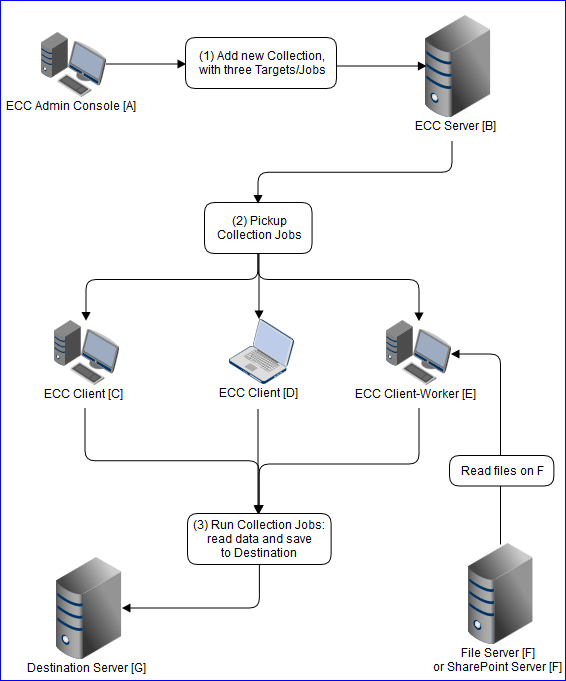
A new Collection is added via Administration Console "A". The Collection specifies a file collection from three Targets. A Job for each of the three Targets is saved on ECC Server "B" – each Job consists of a single file collection Task.
Client computers "C", "D" and "E" fetch their respective Jobs from ECC Server "B".
At the scheduled start time, Client computers "C", "D" and "E" begin their respective Jobs, collecting files (and folders) from the locations defined in the Targets, and saving these files to the Destination located on Server "G".
In this example, Clients "C" and "D" collect files from Targets on their local hard disks. Client "E" is a Worker PC, which collects files from a Target on Server "F" (e.g. a UNC share on a File Server, or a SharePoint Server URL).
The Destination folder can reside on any computer, network storage device, Amazon S3 bucket, or Azure Blob Storage container which is accessible to the ECC Clients, and which has sufficient free disk space to store the entire collection.
As the three Clients process their file collection jobs:
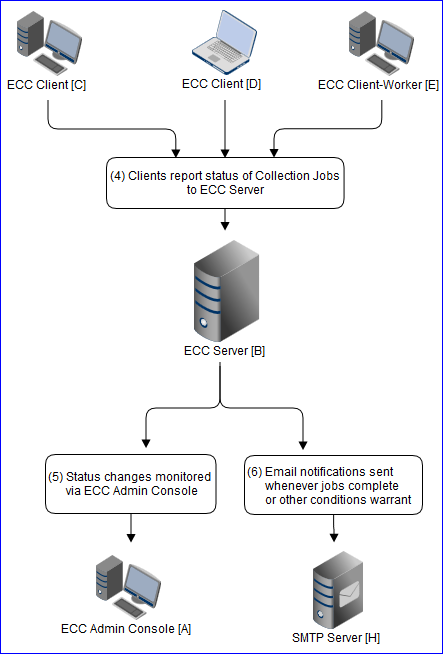
The Clients report their status back to the ECC Server "B".
Status changes are tracked by Administration Console "A" and by ECC Server "B".
The ECC Server sends email notifications via SMTP Server "H", located within your network or outside it.
Notifications are typically sent when a collection job finishes, or when unexpected delays or errors are encountered. Notification recipients and timing are configurable.
See the following image for a diagram outlining this collection process.
Note: The exact collection process may vary depending on the tasks in the collection. For example, File Delete tasks and Launch Command tasks do not save copied data to a Destination.
Collection Center user roles
Collection Center encompasses several user roles:
| Role |
Description |
| Systems administrator |
Installs Collection Center components. Configures the Server, Server Connection Profiles and Email Notifications. Assists Collection Administrators in gaining access to Target computers, selecting Destinations for collected files, and reviewing task configurations for deletion tasks and command launch (execution) tasks. Monitors network performance during large Collections. |
| Collection administrator |
Establishes Cases (projects) and Collections. Configures and schedules Collections consisting of various kinds of tasks. Monitors active tasks and reviews the status of completed tasks. Receives email notifications regarding ECC activities. |
| Custodian |
Custodians are users who are responsible for a set of files to be processed. Custodians must ensure that their computers are up and running before an ECC job is scheduled to begin (for security, their computers can be locked or remain at a login screen). The Client component runs in the background on each Custodian's computer, so the Custodians do not need to learn how to operate Collection Center. |
| Collection reviewer |
Examines the Collection Logs and any collected files. Imports collected files into Nuix Workstation™ or other program for searching and analysis. |
None of the above Collection Center roles are formally defined*. For a small organization, all these roles could be held by a single individual.
* For legal discovery collections, the term Custodian may have a formal legal definition, depending on the rules of evidence in effect for the case.