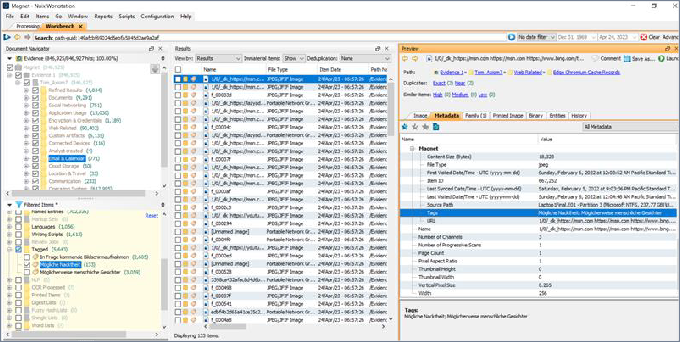
Ingest a Magnet AXIOM portable case
In this version, you can ingest Magnet AXIOM portable case data in the same way that you ingest other kinds of evidence types. This functionality is useful when, for example, you want to bring evidence into Nuix Workstation that Digital Forensics and Law Enforcement personnel and lawyers have already reviewed and commented on in a portable case.
Unprocessed data that is imported into Nuix Workstation may yield slightly different results than that same data imported into Magnet AXIOM. When you ingest an existing Magnet AXIOM portable case into Nuix Workstation, the data in that portable case is not re-processed.
To ingest a Magnet AXIOM portable case:
In Nuix Workstation, in the Add Case Evidence dialog box, select Add > Add Evidence.
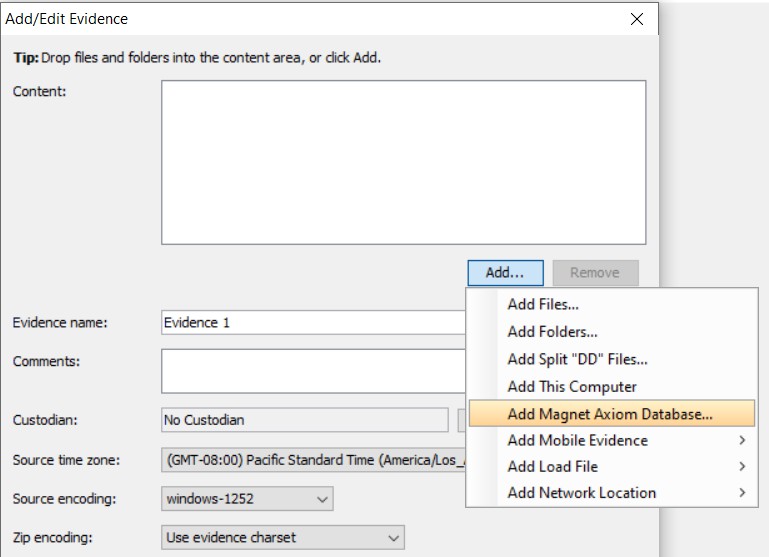 In the Add/Edit Evidence window, click Add > Add Magnet Axiom Database.
Browse to the location of the portable case database, select it, and click Open.
In the Add Magnet Axiom Database dialog box, click OK.
Depending on the size of your database, it may take several minutes to ingest the portable case data.
Additional information about ingested Magnet AXIOM portable cases in Nuix Workstation
Once ingested, any comments that were added in the Magnet AXIOM Portable case appear in Nuix Workstation as tags.
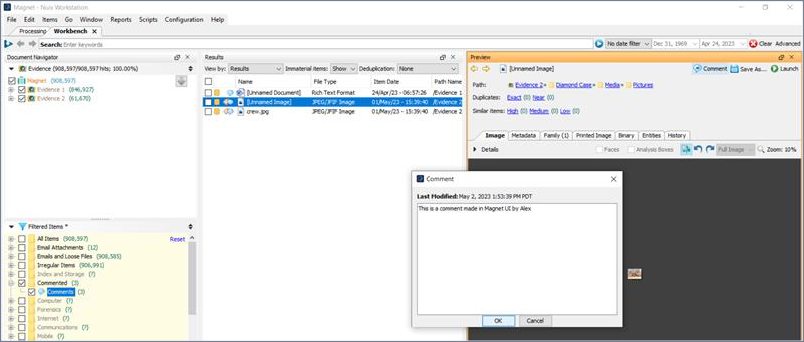
Any Items Tags that were added in the Magnet AXIOM Portable case appear as tags in Nuix Workstation.