Define numbering and filenames for load file exports
This section is part of completing details on the Legal Export dialog, but focuses on how to:
Define a Simple sequential numbering scheme
Define a Granular scheme numbering scheme
Define filenames per file type
Define a Simple sequential numbering scheme
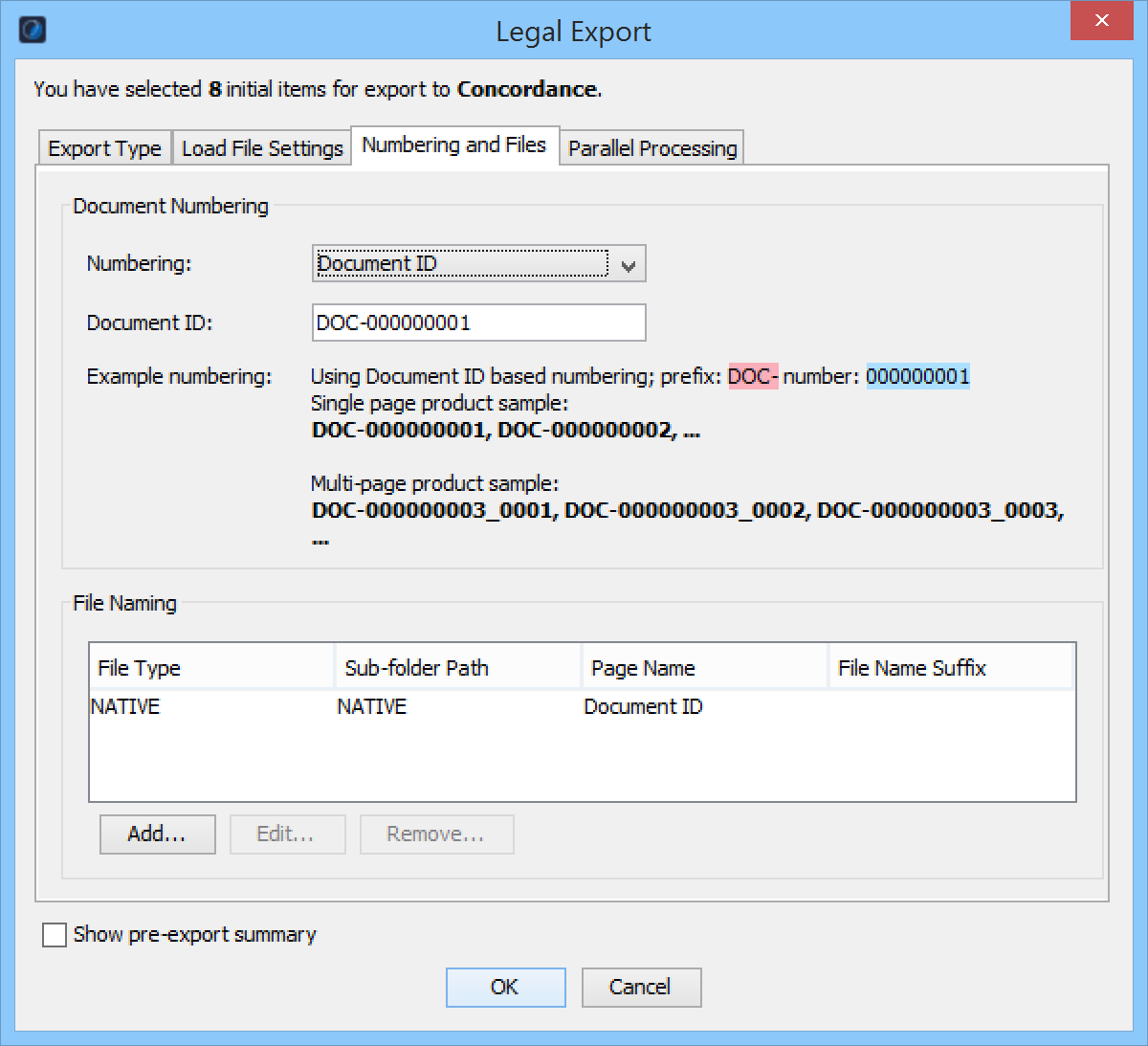
If you selected Concordance, Summation, Ipro, or Discovery Radar as the program to import your load file, then on the Numbering and Files tab of the Legal Export dialog, define a simple sequential numbering scheme for the file as follows:
| Action |
|
| Numbering |
Select which of these numbering schemes you want to use: Document ID: (Default) To sequentially assign a nine-digit number, with an alphanumeric prefixed to each document, allowing for a legal export of up to 999,999,999 items. Use the Start at text field to modify the number of digits or change the prefix. Note: If you use this field, Nuix Workstation auto-detects the pattern and shows a matching preview. This is the case for all the simple numbering options. Box, Folder, Page: To sequentially assign a nine-digit number to each document, allowing for a legal export of up to 999,999,999 items. Available only for a Ringtail load file format, you can also more granularly define each numerical segment in the Box, Folder, and Page fields. Folder, Page: To sequentially assign a six-digit number to each document, allowing for a legal export of up to 999,999 items. Page: To sequentially assign a three-digit number to each document, allowing for a legal export of up to 999 items. Prefix, Box, Folder, Page: Per the Box, Folder, Page option, but where only the text string in the prefix field is included at the start of the document number. Prefix, Folder, Page: Per the Folder, Page option, but where only the text string in the prefix field is included at the start of the document number. Prefix, Page: Per the Page option, but where only the text string in the prefix field is included at the start of the document number. |
| Document ID |
The Document ID is a nine-digit number, with an alphanumeric prefixed to each document. (Default value = DOC- 000000001). This ID increments sequentially on each new document with continuous page numbering (all the other types) increments on each page. |
| File Naming |
Click Add to add a File Type, and for each type you want to export (Native, text, TIFF, PDF, Thumbnails, or XHTML Report), define its: Sub-folder path in the export directory where they are written. File Name Suffix for how to number items of that type. See the following Define file names per file type subsection for details. |
Define a Granular scheme numbering scheme
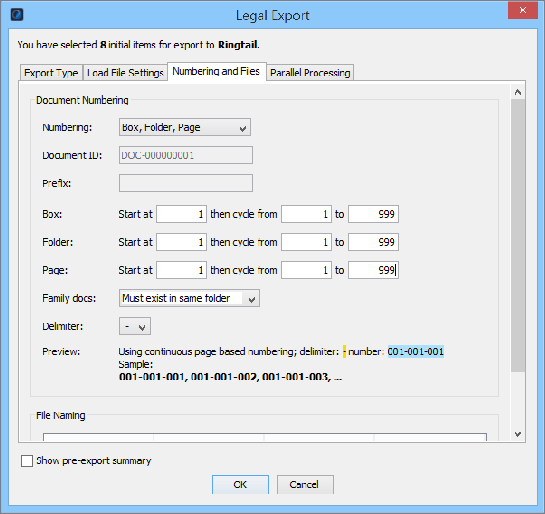
If you selected Ringtail (MDB) or Discover Flat File as the program to import your load file, then on the Numbering and Files tab of the Legal Export dialog, define a granular numbering scheme for the file as follows:
| Options |
Action |
| Numbering |
Select which of these numbering schemes you want to use: Document ID: (Default) To sequentially assign a 9-digit number, with an alphanumeric prefixed to each document. This allows a legal export of up to 999,999,999 items. You can change the prefix and enter a different number of digits in each Start at field which auto-detects the pattern and shows a matching preview for all the simple numbering options. Box, Folder, Page: Only for a Ringtail load file - To sequentially assign a 9-digit number to each document, allowing for an export of up to 999,999,999 items, and define segments in the Box, Folder, and Page fields. Folder, Page: To sequentially assign a 6-digitnumber to each document, allowing for a legal export of up to 999,999 items. Page: To sequentially assign a 3-digit number to each document, allowing for a legal export of up to 999 items. Prefix, Box, Folder, Page: Per the Box, Folder, Page option, but where only the text string in the prefix field is included before the document number. Prefix, Folder, Page: Per the Folder, Page option, but where only the text string in the prefix field is included before the document number. Prefix, Page: Per the Page option, but where only the text string in the prefix field is included before the document number. |
| Document ID |
The Document ID is a 9-digit number, with an alphanumeric prefixed to each document. (Default value = DOC-000000001.) This numbering increments sequentially on each new document, and continuous page numbering (all the other types) increments on each page. |
| Box |
The value you choose for the Numbering setting decides which Box, Folder, and Page fields are active. These fields allow zero padding of up to 7 digits. You determine the Box and Folder rollover values using a 9 for every digit in their respective numbering (for example, a field value of ‘0001’ results in a rollover of ‘9999’). You can set the Page rollover value explicitly. Selecting Folder and Page options produces a numbering scheme of 001001, where the first 001 represents the folder numbering scheme beginning with 1, and the second 001 represents the page numbering scheme beginning with 1. |
| Folder |
|
| Page |
|
| Family docs |
Select one of the following options of how to handle a document family that consists of multiple (pages of) documents: Can exist in multiple folders: To enforce the numbering scheme, and simply span a single-family or document across a folder boundary, that is to break up and number the documents across concurrent folders. Must exist in same folder: To force the entire document family into a single folder (which can mean the number of files/pages per folder can be exceeded). |
| Delimiter |
Leave the default set to a period (.), or use a delimiter like "001.001" to separate box, folder, and page components. Note: If you specify no delimiter, then the numbering becomes unstable later on and you will be unable to reuse it for other operations. |
| Preview |
Ensure the preview example shown of your numbering scheme here is correct; otherwise amend previous details as necessary. |
| File Naming |
Click Add to add a File Type, and for each type you want to export (Native, text, TIFF, PDF, Thumbnails, or XHTML Report), define its: Sub-folder path in the export directory into which they are written. File Name Suffix for how to number items of the selected type. See Define file names per file type for details. |
Define filenames per file type
The File Naming section of the Numbering and Files tab of the Legal Export dialog captures properties you define for the types of files you can choose to export (native, text, TIFF, PDF, Thumbnails, and XHTML Report). This section allows you to add, edit or remove file type definitions.
Note: Only use the Per Page Text option for documents you render to TIFF. Otherwise, it forces Nuix Workstation to create a PDF for each document, then extracts the text from each page of the PDF to create a separate text file which dramatically increases the export time.
Click the Add or Edit to open the Generated Files dialog in which to define the properties of your various export file types. By default, Nuix Workstation provides a definition for the Native file type.
| Options |
Action |
| File Type |
Define any of the following file types: Native: To export documents as individual items that open in their native applications. Text: To export the extracted text of documents. Per-Page Text: To export the extracted text of documents as individual pages created from a PDF of the document. PDF: To export a single 'Searchable PDF' rendering of each document. Image (TIFF/JPEG): To create and export single page TIFFs and JPEGs from the PDF of the document using Ghostscript. Thumbnails: To export thumbnail images for any images that had thumbnails extracted when processed. XHTML Item Report: To create and export this report for each item exported. |
| Sub-folder path |
Define the name of the export sub-directory which is used when natives, text, and images need to be stored in separate folders under the root export directory. |
| Page name |
Decide which of these options to use to stamp the page at the time of production: Item name (sample01.***) Item name with path (evidence/sample01.***) Document ID (000/000/DOC-000000001.***) Document ID with page (000/000/001/DOC-000000001_0001.***) Item GUID (5ed/5ed5c47a-d518-4d9b-b6bb-4231e9324853.***) Item MD5 (790/79054025255fb1a26e4bc422aef54eb4.***) By default, document images in a legal export are Bates Stamped at lower right with Document ID-based numbering with a DOC prefix. For example: The first page of the first document is numbered DOC-000000001_0001; its second page is numbered DOC-000000001_0002. |
| File name suffix |
Add a suffix to exported files. |
To delete a file type definition, ensure it is highlighted in the File Naming table, then click Remove.