Enable Settings to Analyze Named Entities
This section covers how to:
Enable settings for extracting named entities
Enable particular MIME types you want to process
To identify named entities in a data set for further analysis you must enable particular Item Content Settings on the Data Processing Settings tab of the Evidence Processing Settings window or Edit Processing Profile window, as well as make particular selections of MIME types.
Enable Settings for Extracting Named Entities
These settings allow you to conduct processing over the text content of an item and, or search in the metadata properties associated with each item you select from the Results pane. You can use these entity settings in any combination depending on your use case.
To enable settings for extracting named entities:
Open the Evidence Processing Settings window or Edit Processing Profile window. See Configure Evidence Processing settings in the Nuix Workstation User Guide for how to open this window.
Ensure the Data Processing Settings tab is open.
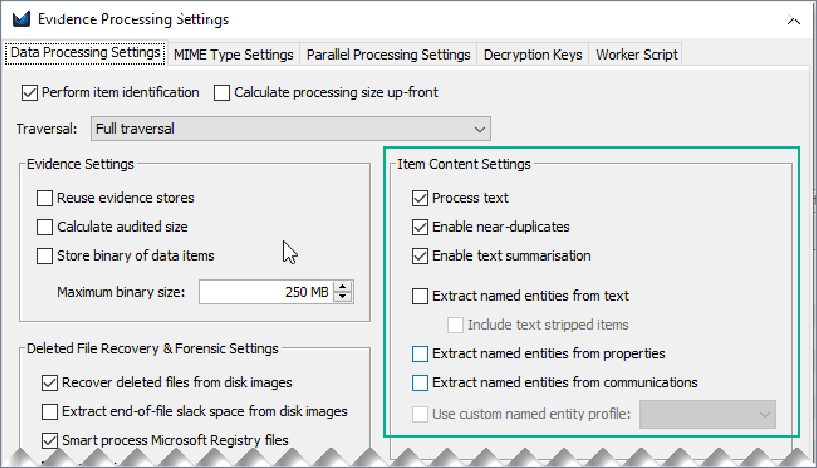
Under Item Content Settings, ensure you select the following options:
| Action |
|
| Process text |
Select to extract the text content of evidence to enable searching. If you disable this option, you can only search across an evidence item’s metadata. |
| Enable near-duplicates |
Select to identify word shingles for Near-Duplicate detection and clustering in the case, and auto-select the Process Text option, if not pre-selected. |
| Enable text summarization |
Select to calculate and store text summaries from documents when data is ingested, and auto-select the Process Text option, if not pre-selected. |
| Extract named entities from text |
Select to extract named entities from the text content of supported file types such as documents, emails, and other fully supported MIME-types. For unsupported files, Nuix Workstation still text strips the data and presents it in Entity Reports if the stripped-out text contains entities. And select Include text stripped items to include text stripped items while extracting named entities from text. See the following About text stripping section for more information. |
| Extract named entities from properties |
Select to search in the metadata properties associated with an item where it identifies entities contained in the metadata and properties of a supported file type, including those found in log files or databases. When dealing with log files like IIS, Apache, or Windows event logs, you must select this option to ensure any entity values contained in the log file fields are identified by Nuix Workstation. |
| Extract named entities from communications |
Select to extract named entities such as phone numbers and email addresses from the communication metadata using Nuix Workstation standard or custom named entities. Enables the Use custom named entity profile option. |
| Use custom named entity profile |
Select to enable selection of a Custom Named Entity Profile for processing from the menu. Note: You must select the Extract named entities from text or Extract named entities from properties option to enable this selection. |
Once processed, matched entities display in a separate group for Custom Named Entities. However, if you do not select a profile in the Data Processing Settings then only the built-in Named Entities are processed. Changes to a profile are only reflected once you reload the evidence.
About Text Stripping
Text Stripping is a process Nuix Workstation uses when it can identify an item’s file type but is unable to cleanly extract all text and metadata in accordance with the file type’s API. The result is a searchable data item, but the text may be garbled or not properly formatted. Text stripping scans the bytes of the data item and looks for runs of string data at least three characters long.
If working with unsupported file types, such as malware scripts and code, selecting Include text stripped items helps in extracting entities from the ASCII text, which is stripped from the given files.
Note: You can also add a Named Entity Profile directly as a Data Processing Setting from the Advanced option while adding case evidence.
Enable Particular MIME Types You Want to Process
The MIME Type Settings tab lists the file categories, file types with their file extensions that Nuix Workstation processes. As an investigator, selecting specific MIME types allows you to specifically target individual files or groups of files to retrieve and extract named entities from only the key data you are interested in.
Note: If your primary interest is in the IP addresses that contain system files or unsupported files, you can deselect every other MIME type and further improve your investigation speeds. In the event you decide to extract entities from more file types, then reload items from the source data and change the MIME type settings accordingly.
To enable which MIME types you want to process (and which to ignore):
Open the Evidence Processing Profile window or the Edit Processing Profile window. See Open the Evidence Processing window in Configure Evidence Processing settings in the Nuix Workstation User Guide.
Select the MIME Type Settings tab to set the item types you want to process. It opens with a complete set of default settings to achieve the best mix of speed and forensic detail. Usually, you do not need to change much on this tab. Click the Reset to defaults link to see all default settings again.
Expand the main MIME Type Settings node if necessary to display all available MIME Types you can process.
Similarly, expand any particular MIME type to see its particular file types, and their extensions. For example, you may only want to select the Email category or only image file types.
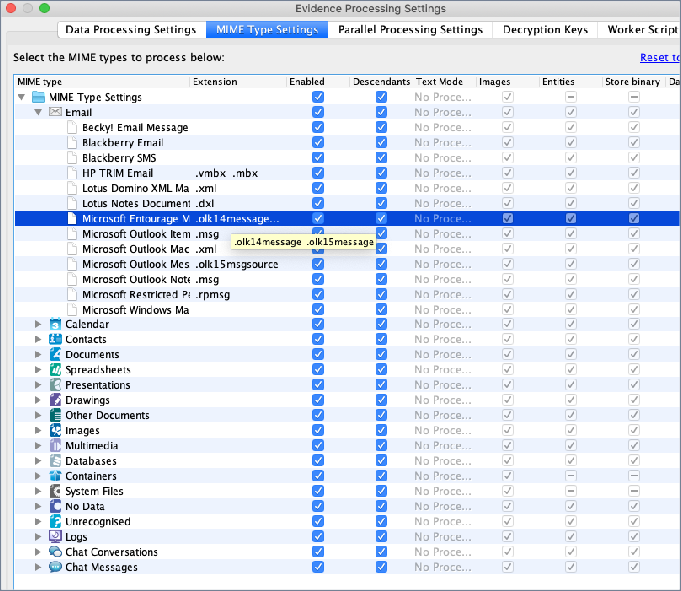
Enable check boxes in the Enabled column and optionally in the Descendants column to select only certain file types and only certain extension types that you need to process. For example, only select the .xml and .msg file types under Email.
Enable check boxes in the Text Mode column, and select to process the text of the selected MIME type, using one of these options:
Process Text
Text Strip (If you select this, by default the descendants are not selected.)
No Processing
Enable check boxes in the Entities column to process Named Entities for the selected MIME type, by identifying and capturing them in the data set for use in further analysis.
Note: To enable doing so, you must have selected the Extract named entities from text option under Item Content Settings on the Data Processing Settings tab.
For information on using other settings on this tab, see Select MIME type and Logtash settings in the Nuix Workstation User Guide.